
A migration assessment is the first step to help you understand the value of and steps to cloud migration
OBJECTIVES
A migration assessment is the first step on your cloud journey, which will help to:
• Understand the benefits of moving from an older on-premises solution to the cloud
• Identify business objectives and tie these into the functionality of Dynamics 365
• Learn how to optimize the migration process with a focus on reducing effort and costs
• Determine your next steps toward cloud transformation
ASSESSMENT WORKSHOPS MAIN COMPONENTS:
1. Functional / business assessment
This component examines your current business processes and assesses how you may be able to benefit from new capabilities and enhancements by moving to the cloud. This assessment includes:
• High-level business process and functional review: Understand your current business processes that are being managed in your on-premises version of Dynamics AX and map that to the capabilities of Dynamics 365
• Customization, ISV and interface assessment: High level assessment of Dynamics AX customizations and ISV-implemented solutions in your current environment. The primary goal of this step is to assess the expected effort and identify the business dependencies involved when migrating to Dynamics 365
• Dynamics 365 system review: Get a summary and high level roadmap of new Dynamics 365 functionality
2. Technical assessment and tools
Customer estimated time commitment: About one hour
To initiate the technical assessment, you simply permit our migration assessor AX system access to help them identify your current technical architecture. This information will then be used to develop an analysis of your current code and determine how it can best be leveraged in Dynamics 365. Microsoft will not access – nor should you provide access – to Peronally Identifiable Information (PII) that is housed within your current Dynamics AX On-Premises solution.
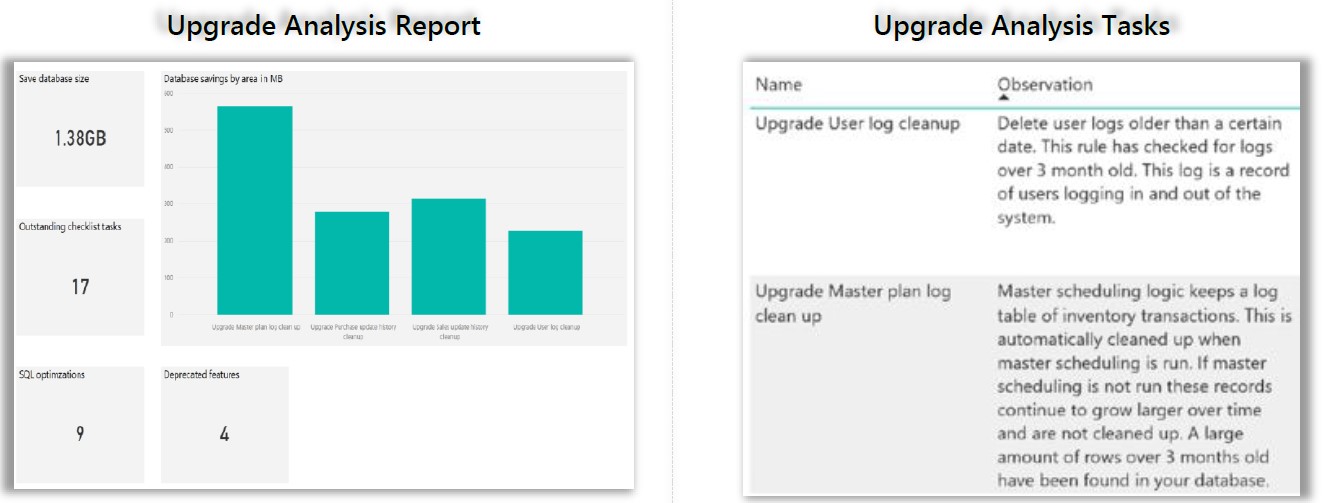
Examples from Dynamics AX 2012 technical assessment reports

Assessment
Microsoft managed assessment delivered virtually typically requiring 4 to 8 hours of a customer s time

Workload
Dynamics AX

Geography
Globally available

Content/Deliverables
Upgrade assessment report
• Review state of current solution
• Preliminary run of code through LCS upgrade tool or migration approach for Dynamics AX 2009 version
• Assessment and joint review of upgrade tool results
• High level estimation ranges for migration project
• Q&A time for your questions around Dynamics 365 upgrade methodology
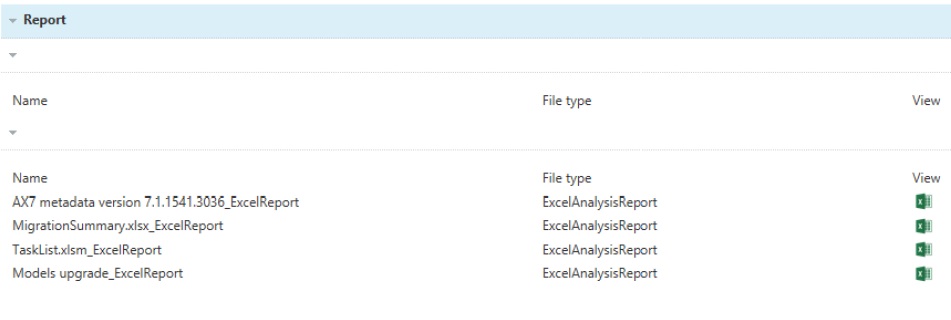
Migration summary and task list report
Contains code analysis summary, including customization information and task list report. Task represents rough estimates of development effort
3. High-level migration summary
Customer estimated time commitment: One to two hours
The Standard Migration Assessment will reveal options based on time, effort, and resources needed to migrate from Dynamics AX to Dynamics 365. The assessment and migration report includes:
• Review of both the Functional and Technical assessment review
• How to best handle existing customizations
• Recommended upgrade approach
• Next steps in the migration journey
Timeline and expected resource engagement
While the Microsoft-managed assessment will be performed over the course of two days, your total time commitment should fall between four and eight hours. See below for further details of what is expected from start to finish.
MIGRATION ASSESSMENT COMPONENTS



Leave A Comment